
How do I create a wiki page?
Updated Reading time: 2 min
On this page
In the wiki, you can either create a completely new section (a standalone page at the top level) or add a subpage to an existing section. Both are done using the same editor—the only difference is in the classification.
Info
To create and edit wiki pages, you need the appropriate permissions (e.g., the Wiki Creator role). If a button is missing, contact the person responsible for Kibi Connect.
Create a new section#
A "section" is a standalone page at the top level (without a parent page).
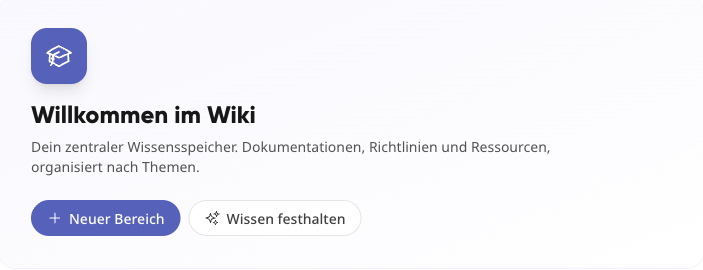
Open the Wiki module.
Click on + New Section at the top.
Assign a meaningful title and write the content in the editor.
Set the status to determine whether the page is a draft or published.
Click Save.
Create a subpage under an existing section#
Subpages further organize a section and are classified directly under an existing page.
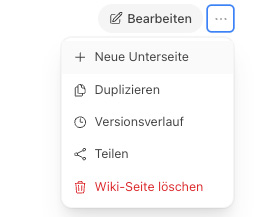
Open the wiki page under which the new page should be placed.
Select New Subpage.
Assign a title and content, then click Save.
Set or change the classification later#
Whether a page is its own section or belongs to an existing section is controlled via the Parent Page / Category field. You can find this field when creating a page and at any time later via Edit.
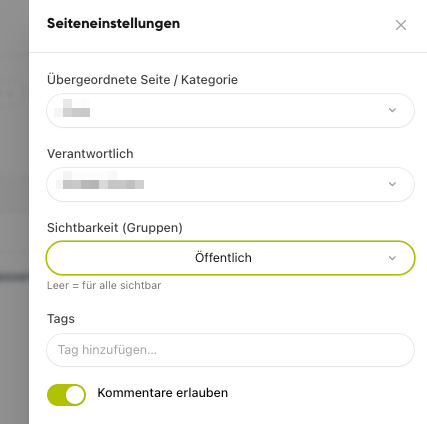
Open the page and click Edit.
In the Parent Page / Category field, select the desired parent page—or change the existing classification.
If you leave the field blank, the page will become a standalone section at the top level.
Click Save.
Tipp
A clear title and correct classification make it easier to find the page later. When creating a page, you can also set a cover image, files, tags, comments, and permissions.