
How can I tell if a colleague is available?
Updated Reading time: 1 min
On this page
In the colleague directory and in the chat, you can see whether and how a person is currently available.
Recognizing a person's status#
-
Green dot on the profile picture
The person is online (currently active in Kibi Connect).
-
Status next to the name
Shows what the person is currently doing – for example, "Do Not Disturb", "In a Meeting", "On the Way", "Sick", "On Vacation", or "Working from Home".
Info
"Do Not Disturb" means the person does not want to be disturbed at the moment. In this case, only contact them for truly urgent matters.
Setting your own status#
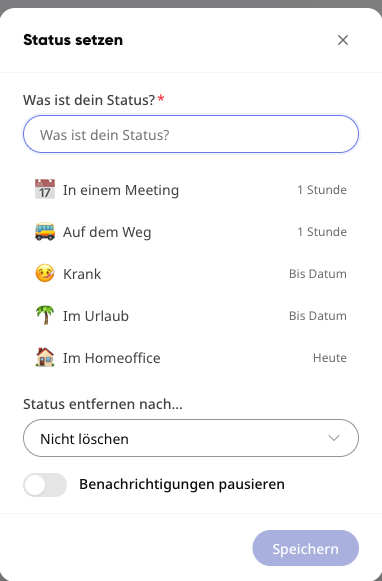
Click on your profile picture in the top right.
Select Update status.
Choose a predefined status (e.g., Do Not Disturb, In a Meeting, Working from Home) or enter your own text.
Optionally, under Remove status after …, set when the status should automatically disappear.
Save.
Info
With the option Pause notifications, you will not receive disturbing notifications while the status is set.