
How do I delete a wiki page?
Updated Reading time: 1 min
On this page
Unnecessary wiki pages can be deleted. Please note a few important points.
Info
Only editors—users with wiki editing rights—can delete and restore wiki pages. Regular members cannot delete or restore pages.
Delete a page#
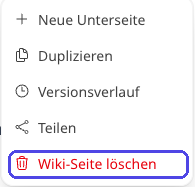
Open the page and click on Edit.
Select Delete.
Confirm the security prompt.
Warning
A page with subpages cannot be deleted. First delete the subpages or move them to another location.
What happens after deletion#
Deleted pages are first moved to the trash and are no longer visible in the wiki.
They remain in the trash for 30 days. During this period, a deleted page can be restored.
After 30 days, they are automatically permanently deleted and can no longer be restored.
Info
You usually won’t find your own trash for recovery in the wiki interface. To restore a deleted page within the 30-day period, contact your administration or a person with wiki editing rights.